LLM Node
The LLM (Large Language Model) node is the intelligence engine of your workflow. It is through it that you process natural language, make complex decisions, analyze unstructured data, and generate creative content using cutting-edge models.

Setup
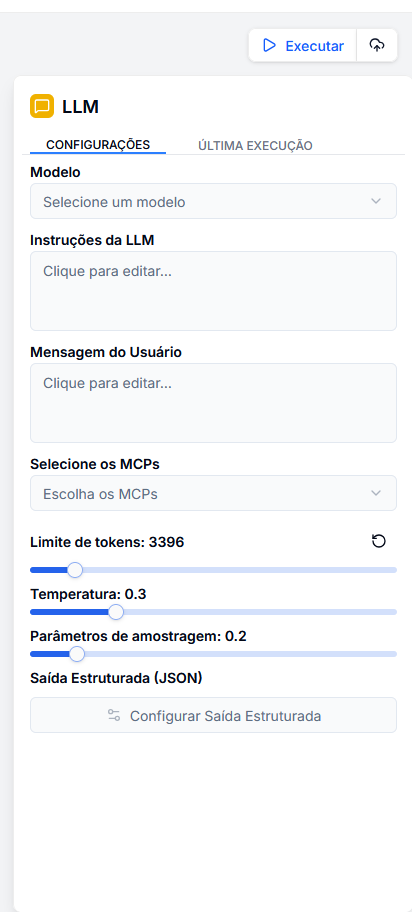
By clicking on the node, the side panel provides full control over the AI's behavior. Below we detail each configuration section.
1. Model Selection
Here in the LLM block, you can select all models that have been added to your project.
Note: When changing models, the system automatically adjusts the maximum token limit supported by that specific model.
2. Prompts and Instructions
This is where you define the personality and task of the AI.
LLM Instructions (System Prompt)
Defines the operational parameters, tone of voice, and limitations of the agent. Think of this as "who the AI is."
You are a senior financial analyst.
Always provide clear explanations and cite sources when possible.
When responding about investments, include risk warnings.
User Message (User Prompt)
Represents the input data for processing. It can be static or dynamic text coming from other nodes.
Analyze the sentiment of the following support message:
Message: "{{ input.customer_message }}"
History: "{{ vector_database.context }}"
3. Tools (MCPs)
Extend the AI's capabilities by connecting it to the external world via MCP (Model Context Protocol). You can select up to 5 servers simultaneously to give the AI skills such as:
- Communication: Send messages on Slack, WhatsApp, or Email.
- Data: Query databases (Postgres, Supabase) or spreadsheets.
- Web: Perform searches on Google or read web pages in real-time.
When activated, the AI autonomously decides when to use a tool based on the user's question.
4. Control Parameters
Adjust the creativity and length of the response:
| Parameter | Recommended Range | Description |
|---|---|---|
| Low | 0.0 - 0.3 | Deterministic and focused. Ideal for data extraction, classification, and factual tasks. |
| Medium | 0.3 - 0.7 | Balanced. Good for general chat responses and virtual assistants. |
| High | 0.7 - 1.0 | Creative and varied. Ideal for brainstorming, creative writing, and idea generation. |
- Top P: An alternative to temperature to control vocabulary diversity (we recommend maintaining the default if changing the temperature).
- Token Limit: Defines the maximum size of the generated response to control costs and verbosity.
Structured Output (JSON)
For reliable automations, free text is not always useful. The Structured Output parameter forces the AI to respond following a strict JSON schema.
By clicking Configure Structured Output, you can visually define the fields or write the JSON schema. Editing one will automatically update the other as long as they are filled in the expected format.
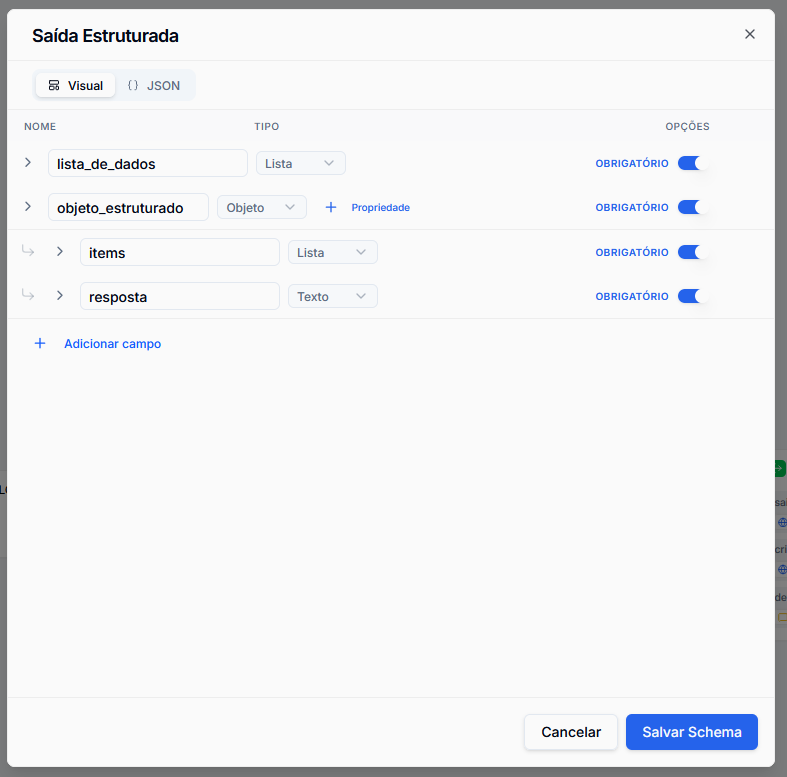
This ensures that the next node in your flow (such as a conditional or HTTP integration) receives clean and ready-to-use data.
Output Variables
After execution, this node provides the following variables for use in the flow:
completion.content: The main text of the response or the generated JSON.completion.usage: Token usage statistics (prompt, completion, total).tool_calls: Technical details if the AI used any MCP tool.
Practical Use Cases
See how to configure the LLM node for different scenarios:
Support Automation (RAG)
- Instruction: "You are a helpful support assistant based on the provided Knowledge Base."
- User: "Answer the question:
{{ input.question }}based on the context:{{ vector_search.chunks }}" - Temperature: 0.2 (To avoid hallucinations).
Data Analyst
- Instruction: "Extract the main entities from the text."
- User: "Text:
{{ file_extractor.text }}" - Structured Output: Activated (defining fields like
names,dates,values).
Content Creator
- Instruction: "You are a creative marketing copywriter."
- User: "Create 5 title variations for a post about:
{{ input.topic }}" - Temperature: 0.9 (For maximum creativity).
Best Practices
- Be specific in the System Prompt: The clearer the rules and limitations, the better the AI's performance.
- Use Structured Output for Integrations: If the data goes to an API or Database, never trust free text.
- Be cautious with Context: Passing entire documents in the prompt can be costly and slow. Use RAG nodes (Vector Search) to filter only what matters before sending to the LLM.