Email Node
The Email node allows your flow to send automatic messages via the SMTP protocol. It is ideal for notifying users or sending AI-generated reports.

Prerequisites (Credentials)
- First, your organization must have an SMTP credential registered.
- With the SMTP credential registered, an admin from the organization must create email credentials for your project.
- In the AI Studio, this node will only list the registered email credentials for you to select.
Configuration
The configuration panel allows you to define who receives the message and what the content will be.
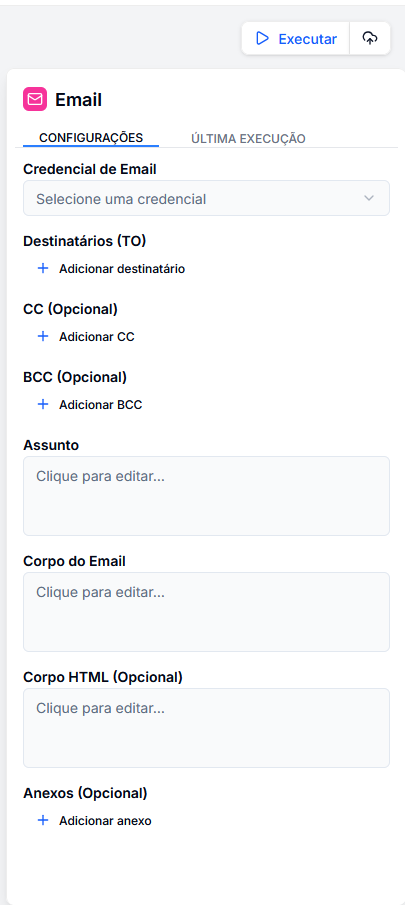
1. Credential Selection
Choose an email credential registered in your project.
2. Recipients
You can add multiple recipients for each category:
- TO: Main recipients.
- CC: Receive a visible copy.
- BCC: Receive a copy without others knowing.
3. Message Content
- Subject: The title of the email.
- Body (Text): The plain text version of the message.
- HTML Body: The formatted version with colors, links, and tables.
4. Attachments
You can attach files by providing the public URL of the file.
Output Variables
After sending, the node returns the status of the operation:
success:trueif sent successfully.message_id: The unique identifier of the sending (useful for logs).
Usage Example: Sending a Report
Imagine a flow that summarizes a meeting and sends it via email.
- Input: Receives the meeting transcript.
- LLM: Generates an HTML summary with topics (
<ul><li>...</li></ul>). - Email:
- To:
{{ input.recipient.email }} - Subject: "Meeting Summary"
- HTML Body:
{{ llm.completion.content }}
- To: