Aggregator Node
The Aggregator Node unifies variables from multiple branches into one output. It evaluates items in order and returns the first valid value.
How It Works
- You add a list of sources in priority order.
- The Aggregator checks the first source, then the next one.
- As soon as it finds a valid value, it returns the result.
- If a source is empty, it automatically moves on.
Configuration Modes
You can use the Aggregator in two ways.
1. Unstructured output
Use this mode when you want to return one single value.
{
  "config": {
    "assign_variables": [
      "{{primary.result}}",
      "{{secondary.result}}",
      "{{fallback.value}}"
    ]
  }
}
{ "output": "value_from_first_valid_branch" }
Configuration
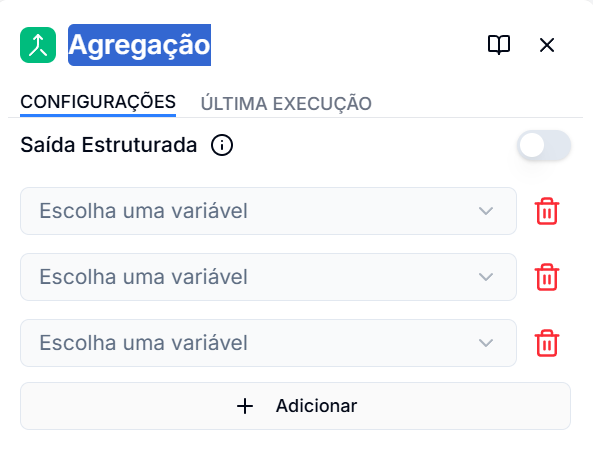
In the side panel:
- Click Add to include new input options.
- Organize them in priority order (the first is the most important).
- If you want a response with fixed fields, enable structured output mode (below).
2. Structured output
Use this mode when you need a fixed set of fields.
{
  "config": {
    "assign_variables": [
      {"result": "{{branch1.result}}", "status": "{{branch1.status}}"},
      {"result": "{{branch2.result}}", "status": "{{branch2.status}}"}
    ],
    "output_schema": ["result", "status"]
  }
}
{
  "output": {
    "result": "value_from_branch1",
    "status": "success"
  }
}
Configuration
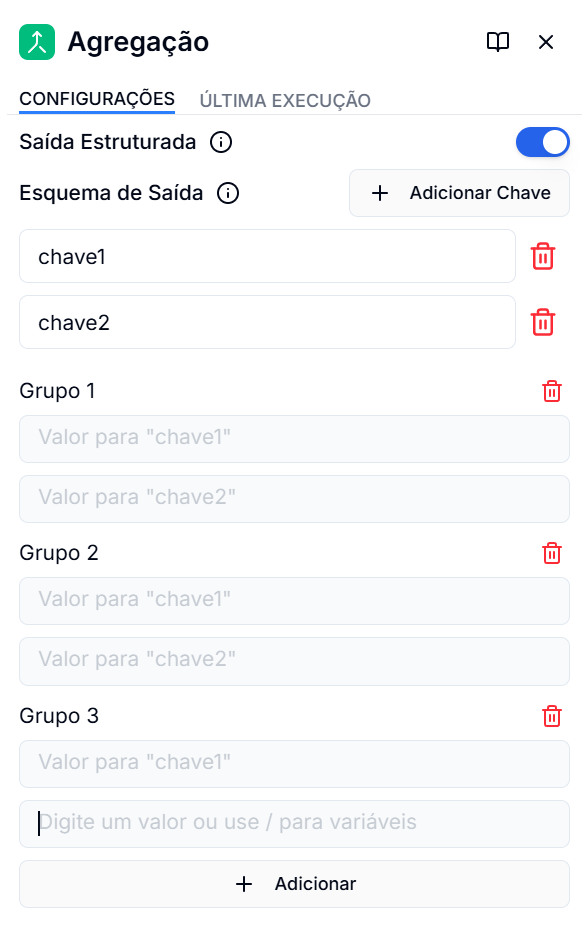
In the side panel:
- Add output keys with the Add Key button and choose each name.
- Add the variable groups you want to compare.
- Select variables for each key in each group.
- The Aggregator compares groups in order and returns the first set of keys with valid values; the output follows the structure of the defined keys.
Output
outputin unstructured mode: single value.outputin structured mode: object with defined fields.
Practical Example
Imagine you want to fetch a response from 3 places:
{
  "assign_variables": [
    "{{api_response.data}}",
    "{{cache.value}}",
    "{{default.value}}"
  ]
}
Result:
- The node tries
api_response.data. - If it is empty, it tries
cache.value. - If that is also empty, it uses
default.value.
Related Nodes
- Conditional: For flow with rules (if/else)
- Input: Define initial data
- Output: Structure final response