HTTP Request Node
The HTTP Request node allows your flow to "communicate" with external systems. With it, you can fetch real-time data (e.g., dollar exchange rate, order status) or send information.

Configuration
This node works as a complete API client.
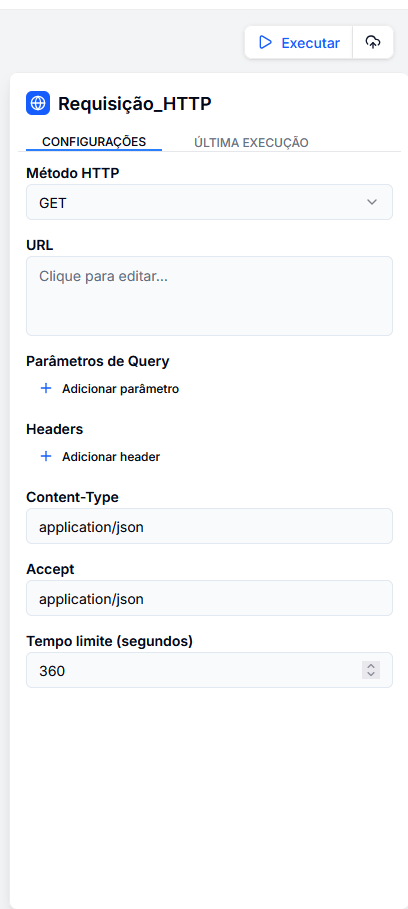
1. Method and URL
- Method: Choose the desired action (
GET,POST,PUT,DELETE,PATCH). - URL: The address of the service.
- You can use variables to make the URL dynamic.
- Example:
https://api.store.com/orders/{{ input.order_number }}.
2. Headers
Mainly used for authentication.
- Key:
Authorization - Value:
Bearer {{ input.api_token }}
3. Body
For methods like POST or PUT, you send data in JSON format.
- You can build the JSON using variables from other nodes.
- Example:
{
  "client": "{{ extractor_cpf.cpfs[0] }}",
  "reason": "{{ llm.classification }}"
}
4. Advanced Settings
- Timeout: Maximum time (in seconds) the flow waits for a response before failing (default: 360s).
- Content-Type / Accept: Defines the data format (usually
application/json).
Output Variables
The node returns two crucial pieces of information for the continuity of the flow:
status_code(Number): The HTTP response code (e.g.,200for success,404for not found,500for error).detail(Object/Text): The body of the API response. If the API returns JSON, it will automatically be converted into an accessible object.
Example Response (JSON)
If you queried a Weather API, the variable {{ http_request.detail }} might contain:
{
  "city": "São Paulo",
  "temperature": 25,
  "condition": "Sunny"
}