Iteration Node
The Iteration node allows for the automatic processing of lists of items. If you have a list of 10 documents and want to summarize each one individually using the same logic, this is the node you should use.
How It Works
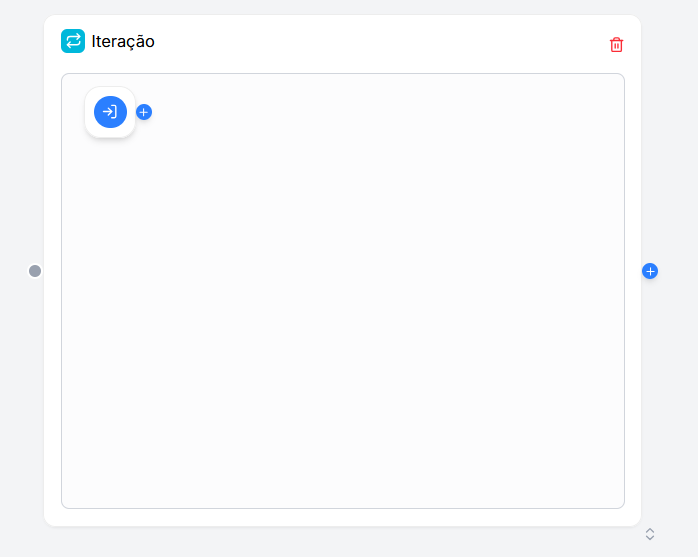
Unlike other nodes, the Iteration creates a Sub-flow.
- Input: It receives a list (Array) of data (e.g., list of files, list of emails).
- Processing: It executes the nodes that are inside it for each item in the list.
- Output: It groups the individual results and returns a new list with the responses.
Configuration
In the side panel, you define what goes into and comes out of the loop.
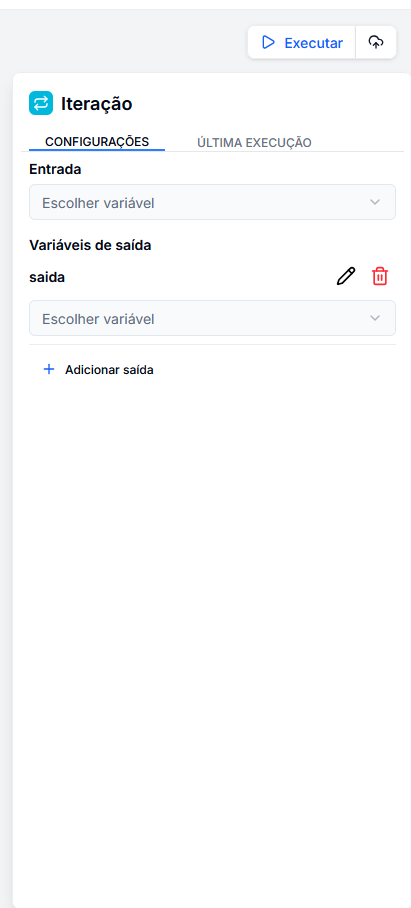
1. Input
Select the list to be processed.
- It must be a variable of type List/Array.
- Example:
{{ file_extractor.contents }}(a list of extracted texts).
2. Output Variables
Here you define which data from the sub-flow you want to bring outside.
- Output Name: The name of the new list that will be created (e.g.,
summaries). - Source Variable: Which data from the sub-flow should be collected (e.g., the LLM response inside the loop).
Building the Sub-flow
When you add an Iteration node, you will notice that it is visually larger and has a Start Node (Blue) inside it.
The Start Node of the Iteration
This small blue node represents the current item being processed. It provides two variables for the internal nodes:
item: The content of the current item in the list.index: The number of the item's position (0, 1, 2...).
Connecting the Internal Logic
To process the data, click on the blue circle with the "+" to the right of the node and select the new node to be added.
Example of Internal Configuration:
- Connect the Start of Iteration to a LLM.
- In the LLM prompt, use:
Summarize this: {{ iteration_start.item }}.
Practical Example: Summarizing Multiple Files
Imagine you want to summarize 5 different PDF contracts.
- Main Node: Uses the File Extractor to generate a list of texts.
- Iteration Node:
- Input: Receives the list from the extractor.
- Sub-flow: Contains an LLM with the prompt "Summarize this contract".
- Output: Maps the LLM response to a variable called
summary_list.
- Final Node: Receives
{{ iteration.summary_list }}containing the 5 prepared summaries.