Code Executor Node
The Code Executor Node allows you to run custom scripts within your flow. It is the tool to transform data, perform complex calculations, or apply business logic that is not covered by standard nodes.

Configuration
In the configuration panel, you define the inputs, the code, and the outputs.
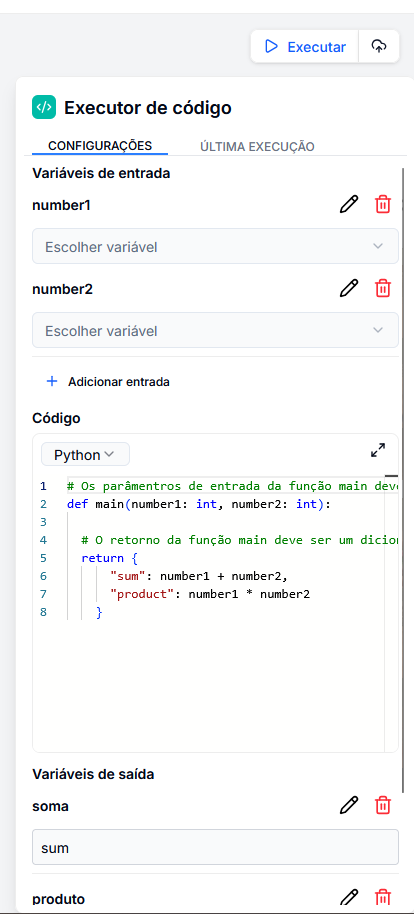
1. Input Variables
Define what data your code will receive.
- Field Name: The name of the variable that will be used within the code (e.g.,
text,number1). - Value: Where the data comes from (e.g.,
{{ input.message }}).
2. Code Editor
Choose the language (Python or Node.js) and write your logic.
Mandatory Structure (Python):
def main(arg1, arg2):
    # Your logic here
    result = arg1 + arg2
    return {
        "sum": result
    }
Mandatory Structure (Node.js):
export function main(arg1, arg2) {
    // Your logic here
    const result = arg1 + arg2;
    return {
        sum: result
    };
}
Attention: The names of the arguments in the
mainfunction must match exactly with the names defined in "Input Variables".
3. Output Variables
Map the return of your code to flow variables.
- Output Name: What this variable will be called in the next nodes (e.g.,
final_result). - Return Key: Which key of the dictionary/object returned by the code should be fetched (e.g.,
sum).
Usage Examples
Date Conversion (Python)
Convert an American date (YYYY-MM-DD) to Brazilian format (DD/MM/YYYY).
- Input:
american_date=2023-12-25 - Code:
def main(american_date):
    year, month, day = american_date.split('-')
    return {
        "brazilian_date": f"{day}/{month}/{year}"
    }
- Output: Map
formatted_dateto the keybrazilian_date.
Mathematical Calculations
Calculate the total amount of an order with tax.
- Inputs:
amount(100),rate(0.1) - Code:
def main(amount, rate):
    total = amount * (1 + rate)
    return {
        "total": round(total, 2)
    }
List Manipulation
Filter a list of products to only include those that cost more than 50.
- Input:
product_list(Array of objects) - Code:
def main(product_list):
    filtered = [p for p in product_list if p['price'] > 50]
    return {
        "expensive_products": filtered,
        "count": len(filtered)
    }