Input Node
The Input node is the mandatory starting point of any workflow. It acts as the "entry point," defining what information and variables the flow needs to receive in order to begin processing.
Overview
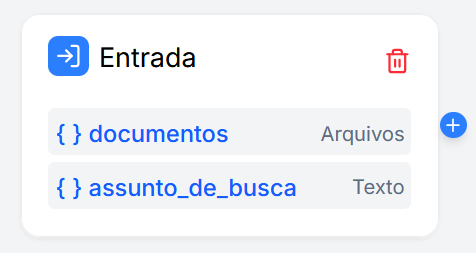
On the canvas, the Input node visually displays the list of configured variables. These variables will be available for use by all subsequent nodes.
Configuration
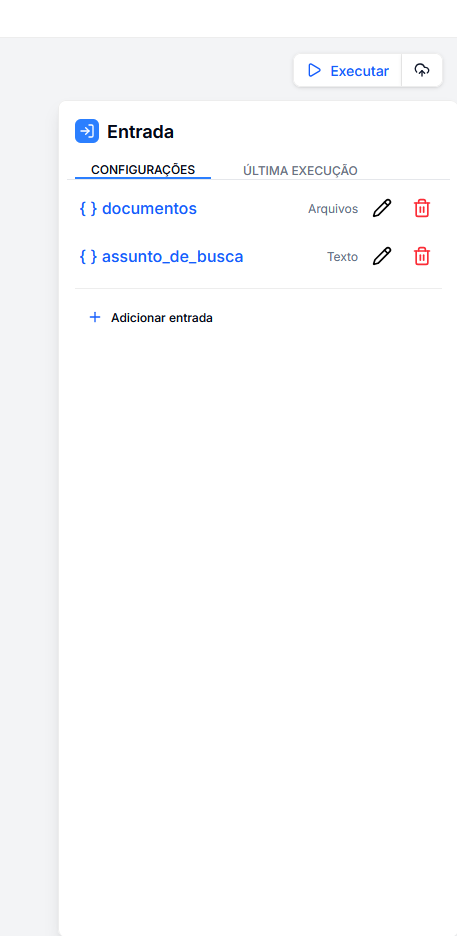
By clicking on the Input node, the right sidebar allows you to manage the data schema of your flow.
Managing Variables
The panel lists all currently configured variables. For each item, you have the options:
- (✏️) Edit: Opens a modal to change the name, type, or description of the variable.
- (🗑️) Delete: Removes the variable from the input schema.
Add New Input
By clicking the + Add input button in the sidebar, a configuration window opens. Here you define the details of the new variable:
- Field Name: The identifier for the variable (e.g.,
user_message,cpf,uploaded_files). The system automatically formats it to a user-friendly pattern (snake_case). - Type: Defines the expected data format.
- Text: For simple strings, sentences, or paragraphs.
- Number: For numeric values (integers or decimals).
- Files: For lists of documents or images uploaded by the user.
- Description: An explanatory text about what this field should contain (useful for internal documentation of the flow).